This is This Zombie Life

We have another video for you today! We’re showcasing one of our favourite pieces of Jack and Eugene’s Abel Radio show: This Zombie Life. It’s a post-apocalyptic spoof of the excellent This American Life radio broadcast and it features at the end of our current run of Radio Abel content. In case you haven’t reached that far yet, or would like to listen to it again, we’ve stuck it in the video above for your listening pleasure. 

With This Zombie Life, we’ve broken the fourth wall a bit and allowed ourselves to be transported to Abel Township for a short time. Sure, you’ll hear the story about how Sam Yao broke his axe handle, but you’ll also hear Naomi Alderman (Zombies, Run!’s lead writer), Matt Wieteska (producer and writer on the game) and Adrian Hon (CEO of Six to Start) give their own accounts of life after the zombie outbreak.

We’re looking to do more stuff like this in the future, as long as you guys enjoy it, so please let us know what you think!

Have you heard your voice in Radio Abel yet?

It’s been a while since we asked you to send in your own voice clips for Radio Abel. Since then, we’ve integrated them into our Radio Abel scripts, recorded new dialogue for Jack and Eugene and added them to the game. You know, no big deal. We’ve got some left over for use in Season 2, and we may be asking for some more from you before too long – because we just can’t get enough of getting our community members into our game!

In case you haven’t heard any of this new Radio Abel content (there’s a lot of Jack and Eugene to get through nowadays!), we’ve put together a video showcasing one of our favourite Radio Abel episodes, which includes some of your lovely voices. Check it out and let us know what you think; we love to hear from you guys.

The Fastest Music in the World

This is a guest post by our intern, George Lewkowicz (closet statistician)

We want to make everyone better runners. With Zombies, Run!, we realised that we are collecting hundreds of thousands of runs with speed and music data. There have been several scientific studies trying to find the best music to improve a runner’s speed by analysing a track’s speed in bpm (beats per minute).

When I saw the huge amount of run data we have, the inner statistician in me came out, and I realised we can finally settle this debate once and for all! Using simple multi-variate analysis we sought to identify any common relationships within the data and, ultimately, find the top thirty tracks that seem to improve a runner’s speed when playing Zombies, Run!

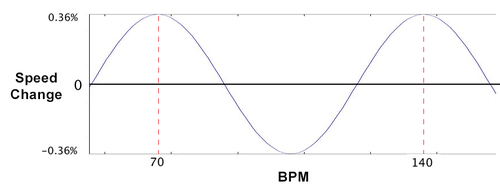
The headline news is that 140bpm IS statistically significant (as found by some other studies). In other words, running to songs with 140 beats per minute will make you run faster. Here’s the relationship:

Other studies have suggested that this is linked to your running gait, because 140bpm is roughly the same pace that the average person runs at. The reason for the other peak at 70bpm is that it’s half of 140bpm, so you get a beat with every other step you take.

Now, before you get excited, a 140bpm playlist will not suddenly turn you into a brilliant runner – it only speeds you up by about 0.36%. Compared to the 2.1% speed-up we’ve found when players are running during their first song – and the 3.4% slow-down during their last song, it’s not a huge amount. 

But we did find a secret that could improve your run: some specific tracks in our database seem to hugely improve running speed. We think it’s all about being uplifted by the track; some songs just have that oomph that drive you forward. So without further ado, here’s are the statistically-evidenced songs that will make you run faster!

(Of course, your mileage may vary…!)

Want to know all the details? Read on…

Assumptions

  • Zombies, Run! users are a representative sample of the population of all runners.
  • Our BPM values for each track are correct, and stay constant (this is almost certainly not true).

Home grown data:

  • Anonymous run logs from all users.
  • Looking at speed during a track.
  • The speed was first been normalised to the run (so we’re looking at percentage increases in speed during a run)

Other data:

BPM for each track. There is NO good place to get this data from the web. The majority of our track data came from http://www.cs.ubc.ca/~davet/music/bpm as this allows us to retrieve it in the most downloadable form, however we also used www.djbpmstudio.com and www.bpmdatabase.com.

Even so we couldn’t find the bpm for the majority of our track data, particularly newer songs. We only used the data for which we had bpm (though this requirement was removed for the calculation of the top 30 tracks). It was then filtered further removing tracks where a user was running either a third faster or slower than their average rate for the runs as to remove people using interval training. Tracks where a zombie chase was initiated were also filtered.

This still meant we had 86,000 rows of data, so there was no need to panic.

Multi-variate analysis was used trying several relationships to bpm. This means we allowed for other reasons as to why a run could be faster, for example the position of the track in the run, and removed the effects when looking at the bpm relationship that we were interested in.

We tried several non-linear relationships to bpm. A linear relationship would mean that the speed would increase as the bpm increased so that you could draw a straight line through the data. As we thought there would be a peak bpm, we needed a non-linear relationship.

The most significant bpm relationship was a sine curve with peaks at 70bpm and 140bpm. Some trial and error was used to see the effect of sine curves with different peaks, however the most significant was 140bpm to the nearest integer at a significance level of 0.2%.

The tracks are listed by the significance of the z-value from the general population of all tracks with the count of n being the number of users that had played the track, and the average increase per user per track used. This means that the tracks are listed by the probability that they make you faster, rather than the amount that they increase your speed.

The t-statistic (a different measurement of probability used for smaller datasets) was considered, but it was felt that we had a large enough dataset that the difference between the two probabilities would be small, and that as we are looking for an ordering rather than a significance it was also irrelevant. All 30 tracks improve running time past a 5% significance level.

While every effort was made to be as statistically rigorous as possible, there are some obvious flaws in our assumptions. The comment section should not be a place to troll our statistics. The songs however should be attacked at will…

Zombies, Run! version 1.5 for iOS now available

Race missions! A fix for the annoying iOS 6 music repetition glitch! Other fun things! All this is now available for Zombies, Run! players with iOS devices via an update to version 1.5. Simply head on over to the App Store and get that download started.

Don’t forget that Zombies, Run! is currently 50% off on every platform until Halloween. So if you haven’t picked it up by now, we can only hope that the promise of even more missions and iPhone 5 support has you toppling off that fence.

We can’t wait to hear what you think of the new missions, so be sure to let us know.

Celebrate Halloween with a Zombies, Run! sale

You might have noticed that Zombies, Run! has been on sale on the Google Play Store for a few days. We were thrilled to be featured on the Google Play Store homepage during this time, since we’re big fans of Android as a platform and we’re always looking to improve our Android version (including bringing Zombies, Run! 5k Training to Android).

To celebrate Halloween, our sale will be continuing for another week – and today, we’re expanding it to include the iOS App Store and Windows Phone Marketplace.


For one week, Zombies, Run! will be 50% off on all platforms. Because what is Halloween without Zombies? It’s the last discount we’ll be doing for a while, so we hope you all take advantage of it. If there’s someone you know on the fence about picking up Zombies, Run!, now would be a great time to let them know (or gift it to them)!

Race missions coming to Zombies, Run!

Zombies, Run! 5k Training is great for beginner runners, but a lot of more experienced runners have asked whether we’ll have any missions for them. The answer is: YES!

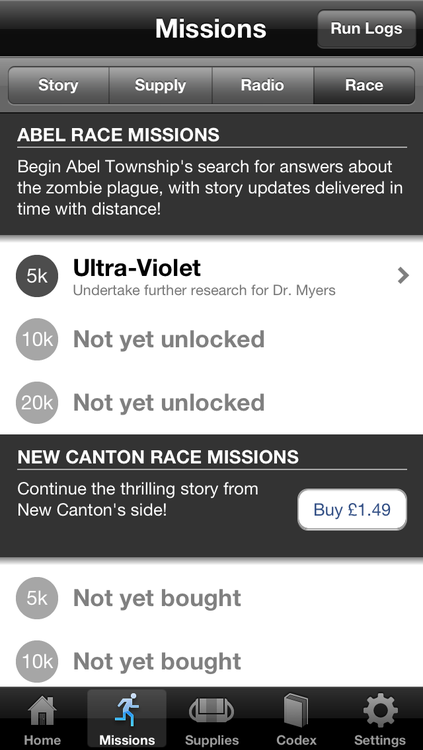
The next update to Zombies, Run! on iOS will have six new ‘race missions’ in total, with three made available for free as part of the update, including one 5k race, one 10k race and one 20k race. Race missions work similarly to normal missions, but with an important difference: story clips will play depending on the distance you have travelled, rather than simply between songs. Don’t worry, those without GPS won’t be left out, because we’ve included a few options for calculating distance from accelerometer mode.

With these missions lasting a bit longer than normal (particularly the 10k and 20k races), you can expect a lot more story to be packed into each. The 20k races, in particular, have been described as “feature film length”. Can’t quite run that far? That’s cool – you can always pause and resume, just like any other mission.

For $1.99, you can also unlock a second set of missions. Again, this includes one 5k race, one 10k race and one 20k race, all bundled together. With these missions we’ve tried something new; the story plays out from New Canton’s perspective. All of these missions take place around the end of Season 1 of Zombies, Run!, though before the big cliffhanger…

Race missions will be made available in an update to the iOS version of Zombies, Run! (version 1.5) in the near future. Version 1.5 will also contain the iOS6 music glitch fix as well as support for the iPhone 5’s higher resolution screen. We’ll let you know as soon as we have a concrete release date here on the blog.

We are planning to add these features to the Android version in the future, as well as announce some new features which will be relevant to both platforms, so keep an eye out for that soon!

Zombies, Run! version 1.2 for Android now available

Android fans, rejoice! We’ve released a new update for Zombies, Run! which adds much-requested functionality and improvements. We’ve added a bunch of new features for you guys, including Level 5 buildings, Radio Abel-only mode and accelerometer tracking for zombie chases. We’ve also updated the Radio Abel clips, so you now have the complete Radio Abel experience on Android.

Here are the full Zombies, Run! (1.2) for Android patch notes. The update is available right now. We hope you enjoy the new content!

  • Radio Mode
  • Tracking via Accelerometer (including zombie chases)
  • Level 5 buildings
  • New Radio clips
  • “No More Radio Clips” announcement
  • Back key functionality on tutorial screen
  • Various bug fixes

Zombies, Run! 5k Training is out now!

We told you it would be soon; Zombies, Run! 5k Training is now available on the Apple App Store for just $3.99! If you missed our blog post with full details on the new game, then make sure you check that out. A version for Android is also in the works and will be made available in the coming months.

We’re very excited to be expanding the Zombies, Run! universe with Zombies 5k and we’re eager to hear any and all feedback, so please be sure to let us know what you think.

There’s plenty more Zombies, Run! in the pipeline, with Season 2 development going strong and more updates to Season 1 (some of which we’ll be announcing very soon) also in production. If Zombies, Run! 5k Training is your first step into the Zombies, Run! universe, then you’ve got a lot to look forward to!

Regarding music playback in iOS 6

We want to let you know that we’re aware of the music playback issues caused by iOS 6 for iPhone and iPod Touch. To fix the problem, we’ve completely rewritten and improved the music player for the next version of Zombies, Run! (1.5), and we’re working hard to get this out to you as soon as possible. Version 1.5 will also include some great new content which we’ll be announcing soon!

In the meantime, you can use the music controls on the lockscreen of your iOS device to skip songs forward if you’re experiencing repeating tracks. Simply double tap the menu button on your device to bring up the controls.

We ask for your patience while we get this update out to you. Once it’s out, you’ll be able to choose from two different music playback options (“New” and “Legacy”) which should fix the iOS 6-related errors. As soon as this update is available, we’ll let you know.